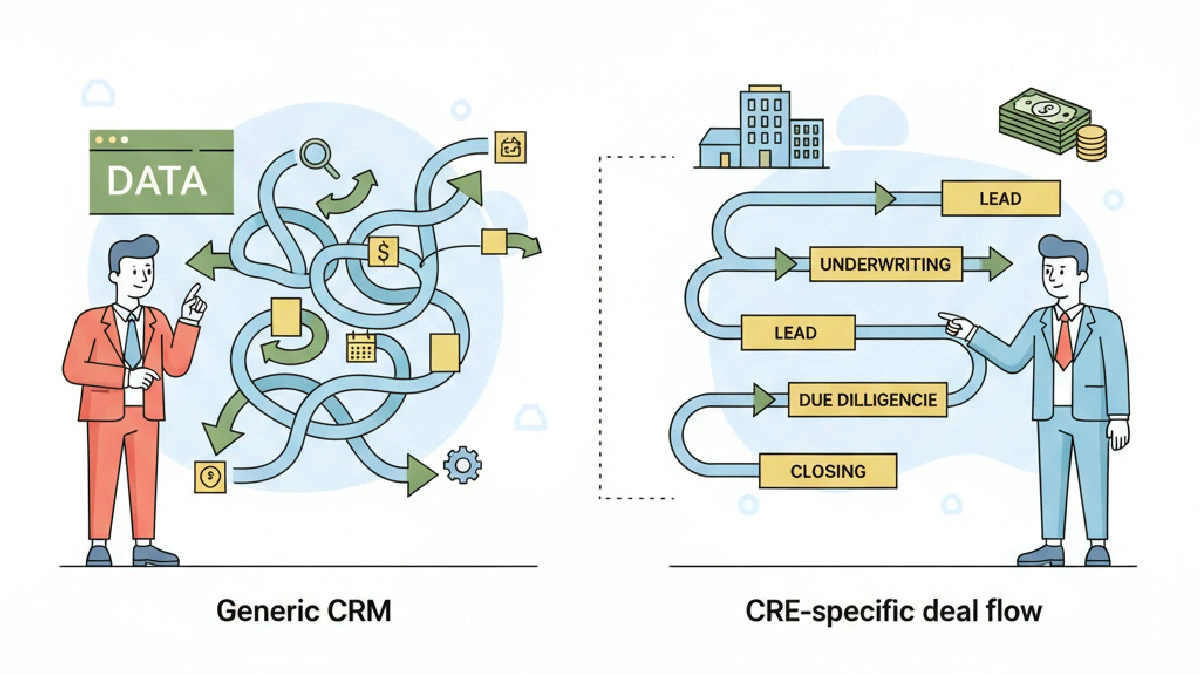
Here's the core idea: generic CRMs were built for linear sales funnels. CRE deal flow is not linear. If you run listings, leases, investor relationships, and asset-level events in the same shop, the underlying data model matters more than pretty dashboards. This post walks through the tradeoffs and gives you clear actions. (how growing CRE shops outgrow spreadsheets: a principal's guide)
Core difference: data model, not UI
The debate of generic CRM vs CRE-specific deal flow comes down to how software models entities and relationships. Generic CRMs tend to enforce a simple record type: contact → opportunity → close. That pattern works for single-decision consumer sales but breaks down for CRE, which centers on assets. Properties, owners, tenants, brokers, loans, leases, and JV partners are distinct entities that must be linked together.
If your system can’t represent a property as a first‑class object with many related contacts and transactions, you’ll end up shoehorning everything into contact notes or custom fields. That creates brittle reports, duplicate records, and fragile exports. (hidden cost of unclear deal ownership in CRE transactions)
Workflow: non-linear pipelines and versioning
Brokers and asset managers juggle parallel processes for the same client or property: listings and buyer relationships, LOIs and due diligence, lease renewals and subleases. These are event-driven and often overlap. CRE-specific platforms accept branching workflows, multiple deal types per asset, and event‑based triggers—so the tool models reality instead of forcing it into a linear funnel. (how disconnected docs slow LOIs and due diligence)
Generic CRMs can approximate this with multiple pipelines, custom objects, or heavy automation. That mimicry works for very small teams or simple portfolios, but it adds setup and maintenance overhead. When you have multiple property types, long cycles, or several people touching the same asset, those workarounds become significant ongoing cost.
Integrations and the rest of your stack
Ask what else needs to live with the CRM: lease abstracts, accounting, document storage, comps, site tours, and inspections are part of CRE ops. CRE-specific deal flow platforms either include modules for these functions or make integrations simpler because they store property and lease objects natively.
Generic CRMs often integrate well for contacts and basic activity but struggle when automation must be tied to property events (for example: trigger a renewal workflow when a lease hits its notice period). You can build that logic with middleware, but then you risk two systems disagreeing on core records—owner‑of‑truth problems are silent productivity killers. (why teams lose visibility between lead and underwriting)
Adoption and the tradeoff of customization
People use tools that match how they work. CRE-specific software increases adoption by mapping fields and actions to broker tasks: pipeline templates for listings and leases, lease milestone alerts, property watchlists, and investor roll-ups. (best commercial real estate deal management for small teams)
Generic CRMs win on raw flexibility and broad integrations. If your team has product/engineering capacity and strong governance, you can model CRE workflows in a generic CRM. But that molding requires ongoing product thinking: documented data models, disciplined field use, and someone to own maintenance. Without that discipline, the CRM becomes a spreadsheet replacement instead of a system of record.
Mini-case: migrating a regional brokerage
Example: a regional brokerage tracked everything as opportunities and used tags for property types. It worked while the team was small, then friction grew when multiple brokers worked the same client across markets.
Steps we recommended, and executed, to de‑risk the migration:
Map the real data model first: list every entity you need (property, lease, owner, investor, loan, listing, showing, LOI, closing checklist).
Audit the generic CRM to see which entities were native, which were custom, and which were absent.
Prototype a minimum viable model. Keep the data model lean: capture only what drives decisions and automations.
Run a parallel period. Let brokers keep the old tool while key users test the new model on a handful of live deals.
Iterate fast. Fix relationships that break reporting or cause duplicate records.
Outcome: the firm kept the generic CRM for contacts and marketing and adopted a CRE-specific deal flow tool for transactions and lease events. (practical operator guide to deal pipeline software) The split reduced duplicate work and created a clear owner of truth for property and deal records.
Decision framework: when to pick which
Be practical. Don’t choose software because it’s trendy. Use this checklist:
Entity complexity: if you manage multiple property types, leases, and investors, favor CRE-specific.
Volume and concurrency: if many people touch the same asset or client, favor a system that supports multi-entity relationships natively.
Integration needs: if you need automation tied to lease events or accounting, favor CRE tools or plan for significant middleware work.
Customization resources: if you have product/engineering resources and clear governance, a generic CRM can be customized; otherwise favor CRE-specific.
Cost of switching: weigh short-term disruption against long-term clarity; sometimes short-term pain to migrate beats years of workaround costs.
Implementation tips operators actually use
Practical moves that make either path work:
Start with the data model, not the pipeline names. Define objects and relationships before you click "create field."
Limit custom fields. Every custom field is future maintenance—use them only when they drive automation or reporting.
Test migrations on a small set of live deals to surface duplicates and missing links quickly.
Define a single owner of truth for property records. Sync other systems to that source instead of copying edits across tools.
Train by role. Brokers need quick actions; operations need structured forms. Build role-based views and access accordingly.
If you use a CRE platform, apply these specific checks to validate fit and avoid the common pitfalls:
Properties as first‑class objects: confirm the system treats property records as native objects you can link to multiple contacts, leases, and deals. Use the Lifecycle Information on property detail pages to see current status and recent transitions so you don’t accidentally duplicate records.
Deal workflows and automation: enable an Investment pipeline (or the matching pipeline toggle in Settings → Pipeline visibility) and validate that moving deals can create action items via Deal Stage Triggers. That keeps follow-ups flowing into the Action Center rather than living in notes.
Calendar and activity alignment: make sure activities and deal-related tasks appear in a shared Calendar so due dates and priorities stay synchronized across teams.
Key takeaways
Pick for data model fit first. UI polish is secondary.
If you can’t represent property, lease, and stakeholder relationships natively, expect workarounds that cost time later.
Plan integrations and a single owner of truth before migrating data.
Validate the model with a parallel pilot on real deals before full cutover.
FAQ
Is a generic CRM ever the right call for CRE?
Yes. If your shop is simple—few transaction types, short cycles, and low concurrency—a generic CRM may be cheaper and faster. You must be disciplined with governance and willing to build and maintain the data model correctly.
When should we build custom features on top of a generic CRM?
Build when you have stable, repeatable workflows that the CRM can’t model natively and when the automation value exceeds the development cost. Don’t build to paper over a poor data model—fix the model first.
How do we avoid creating two conflicting systems of record?
Declare a single owner of truth for each record type and design integrations to sync to that source. If you must keep two systems, limit writable fields to one system and set the other to read-only for those fields.
What’s the fastest way to prove out a CRE-specific tool?
Run a short, focused pilot on a handful of active deals that represent different deal types. Track time saved, duplicate work removed, and any data gaps the pilot exposes; use those outcomes to make the buy‑versus‑build decision.
Actionable checklist
Map your actual data model: list all entities and relationships.
Score your needs: entity complexity, concurrency, integrations, and ops resources.
Run a 30–90 day pilot on live deals before committing to a full migration.
Design integrations to a single owner of truth for property and deal records.
Create role-based views and limit custom fields to those that drive automation or reports.
Make the decision like you run deals: define the problem, prototype a simple solution, and validate on real transactions. The wrong system won’t break your business overnight; it will leak productivity slowly. Fix it early.